The best keyboards for work balance typing comfort, useful layouts and reliable connections with the way you actually work. These picks range from quiet, multi-device office models to compact mechanical keyboards, so consider your need for a number pad, wireless pairing and software customization.
Quick Top Products
JLab JBuds Wireless Keyboard

- 95 soft-touch keys and a media knob offer quiet typing and quick audio control.
- Switch among up to three device connections, including Bluetooth and a USB dongle.
- Rechargeable battery life reaches up to 30 days.
Best For: A shared workspace or desk where quiet typing and switching between devices matter.

JLab Epic Wireless Keyboard

- The 108-key full-size layout includes backlighting.
- Switch among up to three Bluetooth devices and use a USB dongle connection.
- Soft-touch keys, a metal base and a media knob round out the desk setup.
Best For: A desk worker who wants a full-size layout, backlighting and easy multi-device switching.
SteelSeries Apex 3

- Whisper-quiet switches are designed for low-noise use.
- The magnetic wrist rest provides palm support.
- It has IP32 water resistance and 10-zone RGB illumination.
Best For: A desk worker who prefers a wired keyboard with quiet switches and a wrist rest.
SteelSeries Apex 3 TKL

- The tenkeyless layout provides a compact keyboard form factor.
- Whisper-quiet switches and anti-ghosting support quieter, accurate typing.
- A clickable volume roller and media keys control playback and volume.
Best For: A worker who wants a compact, quiet keyboard and can work without a number pad.
SteelSeries Apex Pro Mini Wireless
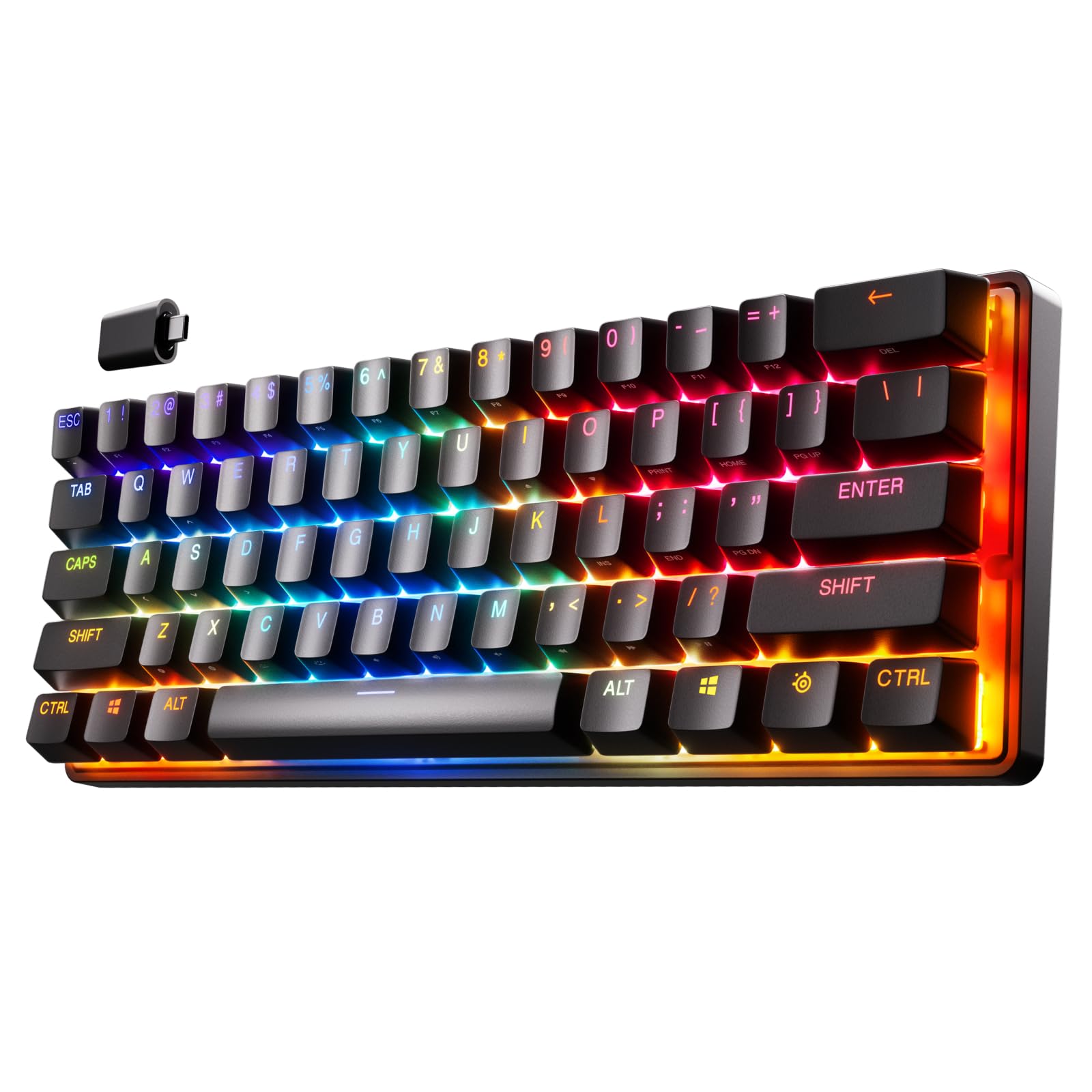
- The compact 60% layout is paired with Bluetooth and 2.4GHz wireless.
- Per-key actuation can be adjusted across 40 levels.
- Two actions can be assigned to one key using different press depths.
Best For: A worker who wants a compact wireless mechanical keyboard with configurable actuation.
JLab JBuds Wireless Keyboard (16-Pack)
- The 95-key board includes a full number pad and media knob.
- Each keyboard supports switching among up to three connections.
- The pack contains 16 black wireless keyboards.
Best For: An organization outfitting multiple desks with wireless keyboards and shared office features.
SteelSeries Apex Pro TKL

- The tenkeyless design retains full-size functionality in a compact form factor.
- Actuation can be customized at 40 levels per key.
- Includes an OLED display, USB-C and USB passthrough.
Best For: A desk worker who wants a compact wired layout with adjustable keys and media controls.
SOLAKAKA A75 Wireless Gaming Keyboard
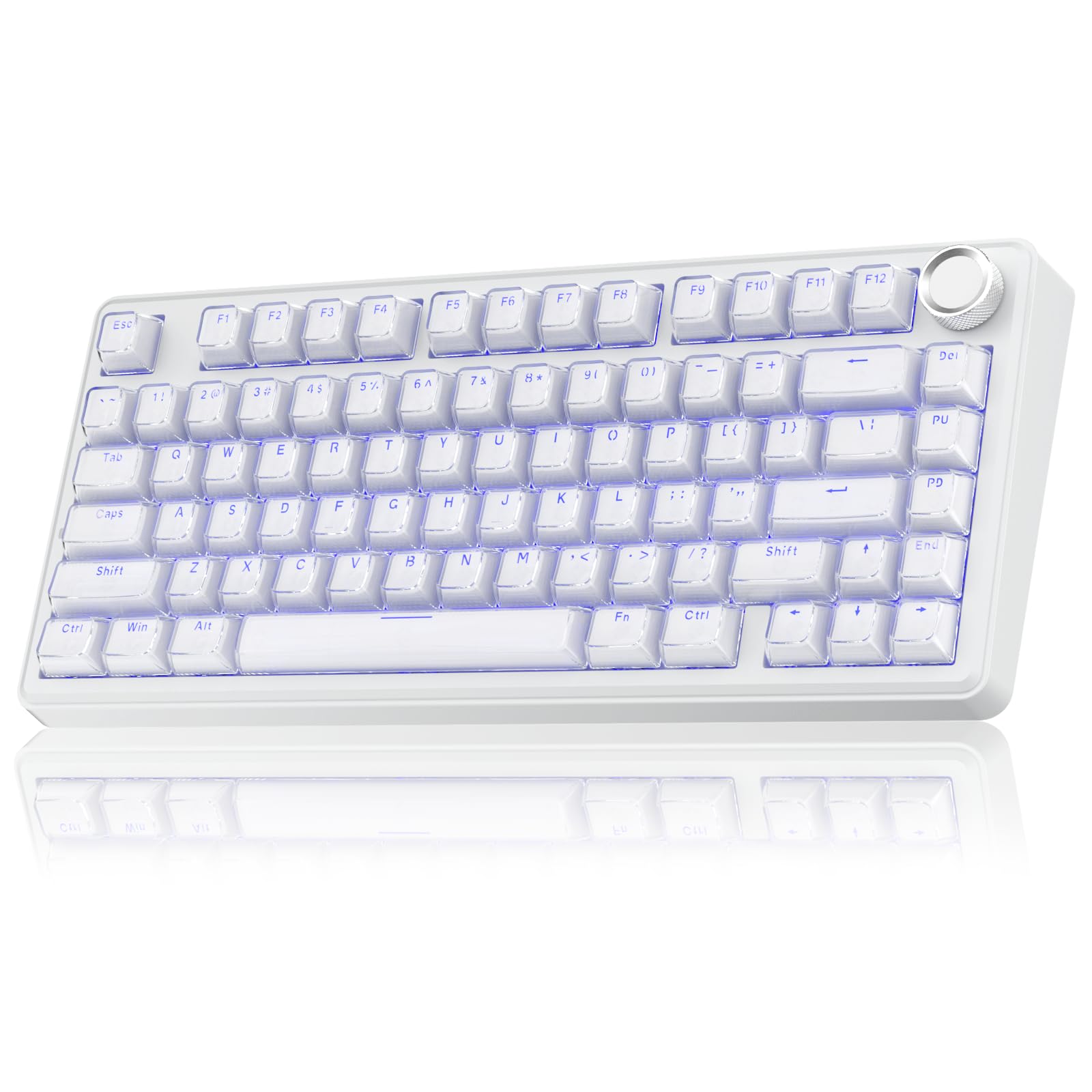
- The 81-key 75% layout retains arrow keys while saving desk space.
- Supports Bluetooth, 2.4GHz wireless and USB-C connections.
- The knob controls mute and volume in office mode.
Best For: A worker seeking a compact wireless mechanical board with a knob and multiple connection modes.
SOLAKAKA A99 Pro
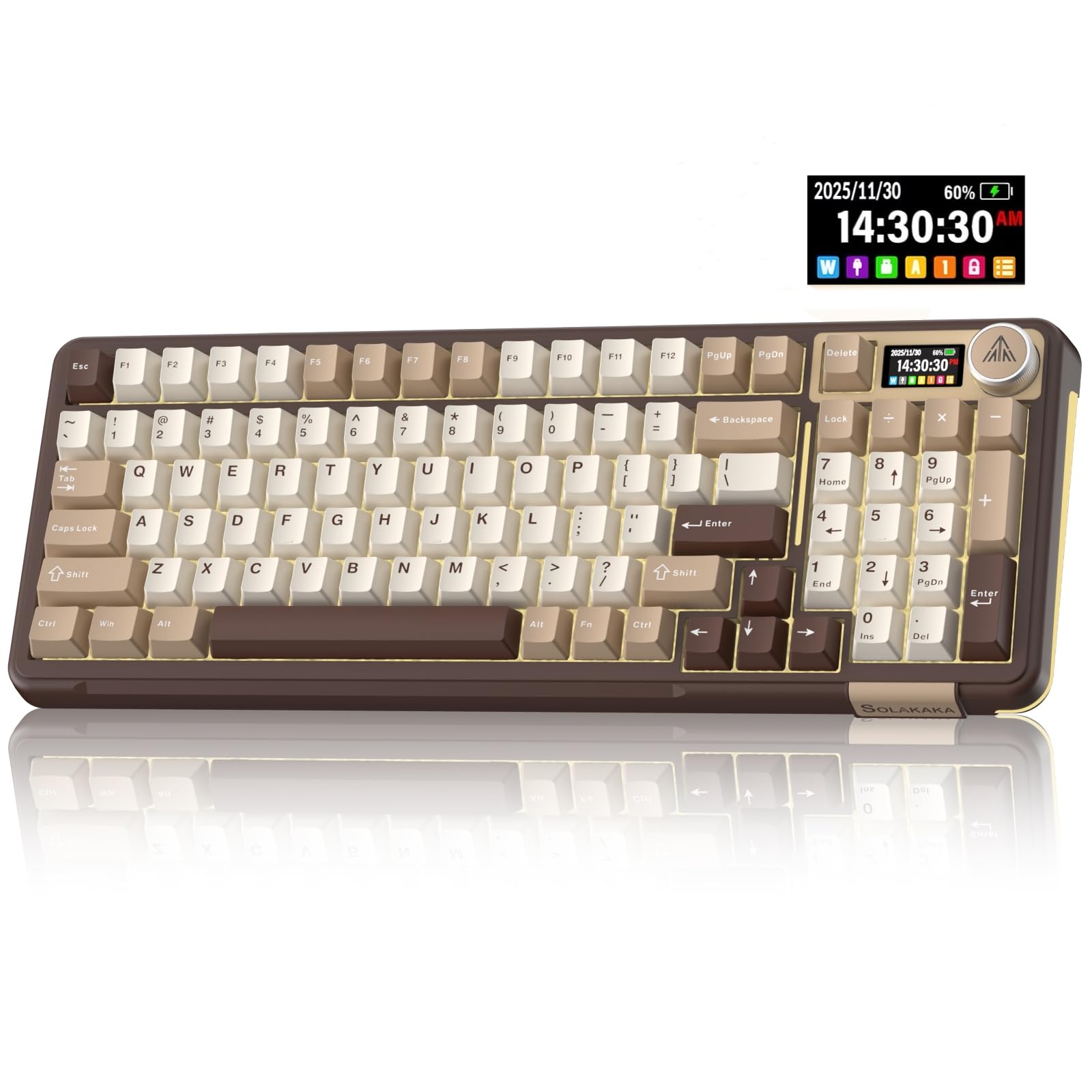
- The screen displays battery, connection and system information.
- Tri-mode connectivity supports Bluetooth, 2.4GHz wireless and USB-C.
- Switches can be replaced without soldering using full hot-swap support.
Best For: A worker who wants a compact mechanical layout, device switching and configurable controls.
Quiet Multi-Device Office Pick
JLab JBuds Wireless Keyboard, 95 Key, Multi-Device Bluetooth and USB dongle, Soft Touch Keys, Media knob, Custom Profiles, Black
The JLab JBuds pairs a compact full-featured office layout with soft-touch keys and a dedicated media knob. Its 95 keys include a full numerical pad, useful for spreadsheets and data entry, while its slim design takes less desk space than a conventional full-size keyboard.
It connects through Bluetooth or a USB wireless dongle and can switch among up to three connections, including two Bluetooth pairings. The rechargeable battery can last up to 30 days, and the JLab Work App supports custom shortcuts and profiles.
Check whether you prefer its compact key arrangement to a standard full-size layout.
Best For: A shared workspace or desk where quiet typing and switching between devices matter.
| Pros | Cons |
|---|---|
|
|
Choose the JBuds if your work involves number entry, multiple devices and a quieter typing feel. The media knob gives quick volume and playback control, while the app's profiles can suit separate routines or users.
Its compact 95-key layout may take some adjustment if you rely on a conventional full-size arrangement. Before buying, check that the connection options match your devices and that the layout suits your daily shortcuts.
Full-Size Backlit Office Keyboard
JLab, Epic, Wireless Keyboard, Bluetooth 5.2, USB Dongle, Multi-Device, Backlit, 108 Keys, Black
The JLab Epic is a full-size wireless keyboard with 108 backlit keys, a metal base and soft-touch keys. Its media knob puts volume control within easy reach, and its backlighting can help when you work in a dim setting.
Bluetooth 5.2 connects to up to three devices, with a USB wireless dongle as another option. The keyboard works with Windows, Mac and iOS, Android, and Chrome OS.
JLab's Work App supports up to three custom profiles. Consider its full-size footprint if desk space is tight, and check that you want a rechargeable model rather than a replaceable-battery design.
Best For: A desk worker who wants a full-size layout, backlighting and easy multi-device switching.
| Pros | Cons |
|---|---|
|
|
Pick the Epic if you want dedicated full-size keys and backlighting for long desk sessions. Its Bluetooth multi-device support and USB dongle provide connection flexibility, while custom profiles can help organize different workflows.
Its full-size layout uses more desk area than the compact JBuds, and battery runtime per charge is not specified. Confirm that you have room for the keyboard and that your operating system is compatible with the app features you plan to use.
Quiet Typing With Wrist Support
SteelSeries Apex 3 RGB Gaming Keyboard – 10-Zone RGB Illumination – IP32 Water Resistant – Premium Magnetic Wrist Rest (Whisper Quiet Gaming Switch)
The SteelSeries Apex 3 uses whisper-quiet switches and includes a magnetic wrist rest for palm support. Dedicated multimedia controls make volume and settings easy to adjust without leaving the keyboard.
Its 10-zone RGB illumination is adjustable, while IP32 water resistance is designed to help prevent damage from accidental liquid spills. This is a wired gaming keyboard, so it suits a fixed desk better than a setup that needs wireless flexibility.
The title identifies the whisper-quiet tactile and silent switch version. Check its complete layout and whether its wrist rest fits your desk before choosing it for everyday typing.
Best For: A desk worker who prefers a wired keyboard with quiet switches and a wrist rest.
| Pros | Cons |
|---|---|
|
|
Choose the Apex 3 if quiet switches and an included wrist rest are priorities at a stationary desk. Its dedicated media controls and spill resistance add practical features, though the wired design gives less placement flexibility than the wireless office picks.
The source identifies it as a gaming keyboard and does not provide its dimensions or key count, so verify the layout and space it will occupy before buying. The IP32 rating does not establish protection against every type of spill.
Compact Quiet Desk Layout
SteelSeries Apex 3 TKL RGB Gaming Keyboard – Tenkeyless Compact Form Factor - 8-Zone RGB Illumination – IP32 Water & Dust Resistant – Whisper Quiet Gaming Switch – Gaming Grade Anti-Ghosting,Black
The SteelSeries Apex 3 TKL uses a tenkeyless layout that leaves more open desk space around the keyboard. Its whisper-quiet switches and anti-ghosting are paired with dedicated multimedia controls, including a clickable volume roller.
The product title identifies IP32 water and dust resistance, and its RGB illumination offers multiple colors and effects. It is a wired gaming keyboard, so it is best suited to a fixed workstation rather than someone who needs Bluetooth or device switching.
Tenkeyless models omit the dedicated number pad, which may slow frequent spreadsheet entry. Check the detailed layout and media-control functions against your routine.
Best For: A worker who wants a compact, quiet keyboard and can work without a number pad.
| Pros | Cons |
|---|---|
|
|
The Apex 3 TKL fits a desk where compactness and quiet keys matter more than a dedicated number pad. The media roller keeps basic audio controls accessible, and the IP32 rating adds a measure of resistance to liquid and dust exposure.
It is wired, and the product details do not identify a wrist rest. Before choosing it for office use, consider how often you enter numbers and confirm the layout works with your keyboard shortcuts.
Wireless Compact Mechanical Keys
SteelSeries Apex Pro Mini Wireless Keyboard - 60% Design - OmniPoint 2.0 - Quantum 2.0 Wireless - Double Shot PBT Keycaps - Black
The Apex Pro Mini Wireless combines a 60% layout with wireless connectivity and adjustable actuation. Its OmniPoint 2.0 switches offer 40 per-key actuation levels, and its 2-in-1 action keys can assign different actions to light and deep presses.
Bluetooth 5.0 and 2.4GHz Quantum 2.0 wireless provide two connection choices, while the aluminum top plate and double-shot PBT keycaps complete the compact build. A 60% board has no dedicated number pad and may rely on key combinations for functions found on larger office layouts.
Check those shortcuts and whether adjustable switches suit your typing preferences.
Best For: A worker who wants a compact wireless mechanical keyboard with configurable actuation.
| Pros | Cons |
|---|---|
|
|
Choose the Apex Pro Mini Wireless if a smaller work surface and wireless operation matter, and you are comfortable with a compact key layout. Adjustable actuation offers detailed key response customization, but may add setup work compared with a straightforward office keyboard.
The product details do not give battery runtime, so check that before relying on it for long sessions away from a charging cable. Also confirm how the 60% layout handles keys you use frequently for work.
Wireless Office Keyboard Multi-Pack
JLab JBuds Wireless Keyboard | Bluetooth and USB dongle, Multi-Device, Media knob, Custom Profiles, Black (16 Pack)
This JLab JBuds version is a 16-pack of wireless keyboards, which makes it a bulk option for outfitting many desks rather than a single-workstation purchase. Each keyboard has 95 soft-touch keys, a full numerical pad, and a media knob for volume and playback control.
Bluetooth 5.2 and a USB wireless dongle provide connection options, with switching across up to three connections. The rechargeable battery can last up to 30 days, and the JLab Work App supports custom shortcuts and profiles.
Confirm the pack quantity and whether each workstation needs an individual dongle or shared Bluetooth pairing before ordering.
Best For: An organization outfitting multiple desks with wireless keyboards and shared office features.
| Pros | Cons |
|---|---|
|
|
This JBuds bundle is relevant when equipping a team, classroom or group of desks with a consistent office keyboard. Its number pad, quiet keys and multi-device support fit varied tasks, while app profiles offer a way to tailor shortcuts.
For an individual desk, the 16-pack is likely more inventory than needed. Before placing a bulk order, verify the included connection hardware for each unit and make sure the layout matches the team's software and number-entry needs.
Compact Wired Keyboard With Media Display
SteelSeries Apex Pro TKL HyperMagnetic Gaming Keyboard - Adjustable Actuation - Esports Tenkeyless - OLED Screen - RGB - PBT Keycaps - USB-C
The Apex Pro TKL combines a tenkeyless layout with adjustable actuation and an OLED display. Its OmniPoint 2.0 switches support 40 per-key actuation levels, and its action keys can be programmed for two responses at different press depths.
The keyboard has a premium aluminum top plate, detachable USB-C and a USB passthrough for another powered device. The TKL format leaves more room than a full-size board, but it does not include a dedicated number pad.
Its gaming-focused controls offer more customization than many office users need, so consider whether those features fit your workday before buying.
Best For: A desk worker who wants a compact wired layout with adjustable keys and media controls.
| Pros | Cons |
|---|---|
|
|
Choose the Apex Pro TKL for a compact wired desk that benefits from adjustable actuation, a display and USB passthrough. The feature set offers more configuration than a basic office board, though the tenkeyless layout is less convenient for frequent number entry.
It also lacks specified wireless connectivity. Confirm that the dedicated keys you need are available through its layout and software, and consider whether the wrist rest and display add practical value to your workflow.
Compact Wireless Mechanical Workstation
SOLAKAKA A75 Wireless Gaming Keyboard with Multifunction Knob, BT5.0/2.4GHz/USB-C, 75% Mechanical Keyboard, Hot-Swappable, Gasket Creamy Keyboard with RGB Backlit, Crystal Keycaps, for PC/Mac/PC
The SOLAKAKA A75 uses a 75% 81-key layout that keeps arrow keys while reducing the space used by less frequently needed keys. It supports Bluetooth 5.0, 2.4GHz wireless and USB-C wired connections, with switching for up to five devices.
A multifunction knob changes roles between gaming and office modes; in office mode, it can mute audio or adjust volume. Hot-swappable switches and a gasket structure add customization and a softer typing feel.
Software support is described, but its platform support and setup details are not fully supplied here. Check the key layout and software compatibility for your work computer.
Best For: A worker seeking a compact wireless mechanical board with a knob and multiple connection modes.
| Pros | Cons |
|---|---|
|
|
The A75 is a fit for workers who prefer a compact mechanical layout but still need arrow keys and several connection options. Its mode-switching knob can handle routine audio adjustments, and hot-swap support gives flexibility to change switches later.
The details do not specify battery life or whether the included switches are quiet, so check those points if you type in a shared room or work away from power. Its 81-key layout also deserves a close look if you use function keys or a number pad often.
Customizable Wireless Keyboard With Screen
SOLAKAKA A99 Pro Mechanical Keyboard with LCD Screen & Metal Knob, Wireless Gaming Keyboard with BT5.0/2.4GHz/USB-C, Hot Swappable Creamy Keyboard, Gasket Structure, RGB Backlit, for Win/Mac
The SOLAKAKA A99 Pro pairs tri-mode wireless and wired connectivity with a screen and multifunction metal knob. The screen can show date, time, battery level, system and connection mode; the knob also controls audio and lighting.
It can save up to five devices across Windows, iOS, Mac and Android, and its gasket structure uses five cushioning layers. Full hot-swap support allows switch replacement without soldering, and software customization includes key mapping and macros.
Its layout size and key count are not clearly identified in these details, so confirm those before buying if you need a number pad or specific navigation keys.
Best For: A worker who wants a compact mechanical layout, device switching and configurable controls.
| Pros | Cons |
|---|---|
|
|
Choose the A99 Pro if you value multi-device connections, a display and customizable mechanical switches. The screen and knob give quick access to status and controls, while hot-swap support allows later changes to the typing feel.
The exact key layout is not identified in the supplied details, making it difficult to know whether it has the dedicated keys needed for office work. Confirm the layout, key count and battery details before committing, particularly if you rely on a numeric keypad.
How to Choose Keyboards For Work
How We Picked Keyboards for Work
We looked for keyboards with practical desk features: comfortable or quiet keys, useful layouts, workplace controls, and connection options that match common setups. The selection includes office-oriented wireless boards, compact models for smaller desks, and mechanical options for people who want adjustable switches or customization.
The range also reflects distinct buying situations. The JLab JBuds pairs soft-touch keys and a number pad with multi-device switching, while the Epic adds full-size backlighting.
SteelSeries options emphasize quiet typing or compact wired layouts. The SOLAKAKA boards bring customizable mechanical features, and the JLab Go and 16-pack JBuds serve mobile and group needs.
Comparing Keyboards for Work
Start with the layout. Full-size and 95-key models keep a number pad for spreadsheets, while tenkeyless and 75% boards save desk area.
The 60% Apex Pro Mini is the smallest layout here, but it relies more on compact key combinations. A99 Pro's exact key count and layout are not specified, so verify those details if dedicated navigation or number keys matter.
Connection choice shapes flexibility. The JLab JBuds and Epic pair with several devices and also offer a dongle, while the Apex Pro Mini Wireless adds Bluetooth and 2.4GHz options.
The wired Apex 3 and Apex Pro TKL suit fixed desks. Some SOLAKAKA models support wired, Bluetooth and 2.4GHz modes, but check the software support for your operating system before relying on custom settings.
Typing feel and sound vary. The JLab JBuds has soft-touch keys, and the Apex 3 models emphasize whisper-quiet switches.
The KI99 silent variant has noise-reduction layers and silent switches; mechanical models with other switch types may feel and sound different. A gasket mount or hot-swap support offers customization, but doesn't by itself establish that a keyboard will be quiet.
| Product | Standout features | Best for |
|---|---|---|
| JLab JBuds Wireless KeyboardCheck Price |
| A shared workspace or desk where quiet typing and switching between devices matter. |
| JLab Epic Wireless KeyboardCheck Price |
| A desk worker who wants a full-size layout, backlighting and easy multi-device switching. |
| SteelSeries Apex 3Check Price |
| A desk worker who prefers a wired keyboard with quiet switches and a wrist rest. |
| SteelSeries Apex 3 TKLCheck Price |
| A worker who wants a compact, quiet keyboard and can work without a number pad. |
| SteelSeries Apex Pro Mini WirelessCheck Price |
| A worker who wants a compact wireless mechanical keyboard with configurable actuation. |
| JLab JBuds Wireless Keyboard (16-Pack)Check Price |
| An organization outfitting multiple desks with wireless keyboards and shared office features. |
| SteelSeries Apex Pro TKLCheck Price |
| A desk worker who wants a compact wired layout with adjustable keys and media controls. |
| SOLAKAKA A75 Wireless Gaming KeyboardCheck Price |
| A worker seeking a compact wireless mechanical board with a knob and multiple connection modes. |
| SOLAKAKA A99 ProCheck Price |
| A worker who wants a compact mechanical layout, device switching and configurable controls. |
Choosing an Office Keyboard Layout
Match key count to routine rather than assuming smaller always means better. Frequent spreadsheet work favors a number pad, while writing, coding or general admin may leave it unused.
A tenkeyless layout gives more mouse room without going as compact as a 75% or 60% keyboard. Check that function, navigation and media controls are reachable on the layouts you are considering.
For shared workspaces, quiet switches and soft-touch keys can reduce typing noise, but the supplied records do not give comparable measured sound levels. The Apex 3 and JLab JBuds explicitly emphasize quieter typing; the SOLAKAKA KI99 silent model also identifies silent switches.
Prefer those clearly described options when low noise is a priority, and confirm that a bundled model's sound profile matches the team environment.
Wireless, Wired and Multi-Device Setups
Wireless keyboards can free a desk from a cable and simplify switching among a computer, tablet or phone. The JLab models support multiple device connections, and several SOLAKAKA options provide Bluetooth, 2.4GHz and USB-C modes.
Check whether your setup needs Bluetooth pairing, a receiver, or a wired fallback. A model's connection count does not establish how quickly it switches or whether every feature works on every operating system.
A fixed workstation may benefit from a simple wired connection, particularly if you do not need to move between devices. The SteelSeries Apex 3 and Apex Pro TKL also add dedicated controls or passthrough features.
If you are evaluating customization software, check platform requirements: some supplied details describe software support only for Windows or wired operation.
Who Should Buy Which Work Keyboard?
For quiet office typing with a number pad, start with the JLab JBuds. Choose the Epic if full-size keys and backlighting matter, or the Apex 3 if you prefer a wired board with a wrist rest.
The Apex 3 TKL and Apex Pro TKL suit smaller fixed desks, with the Apex Pro adding adjustable actuation and an OLED display.
Choose the Apex Pro Mini Wireless when compactness and wireless connections are worth adapting to a 60% layout. The SOLAKAKA A75 fits a compact mechanical setup that retains arrow keys, while the A99 Pro suits buyers who value a screen and extensive customization after confirming its layout.
The JLab Go is geared toward mobile or minimalist use; its four-pack variant, and the JBuds 16-pack, make more sense for multiple desks than for an individual buyer.